How to Automate Invoice Processing (and Stop Typing Them by Hand)
اقرأ هذا المقال بالعربيةInvoices are the perfect thing to automate: they arrive constantly, they follow a predictable shape, and someone on your team is almost certainly retyping their details into a system by hand. It's slow, it's mind-numbing, and it's where costly mistakes creep in. The good news is this is one of the most mature, lowest-risk automations you can put in place. Here's how it works.
What "automating invoice processing" actually means
At its simplest, it's replacing the manual read-and-type loop with software that does it for you. An invoice comes in, as a PDF, a scan, or a photo, and instead of a person reading it and keying the numbers into your accounting or ERP system, an automated pipeline reads it, pulls out the details, checks them, and files them where they belong.
The steps a good pipeline handles
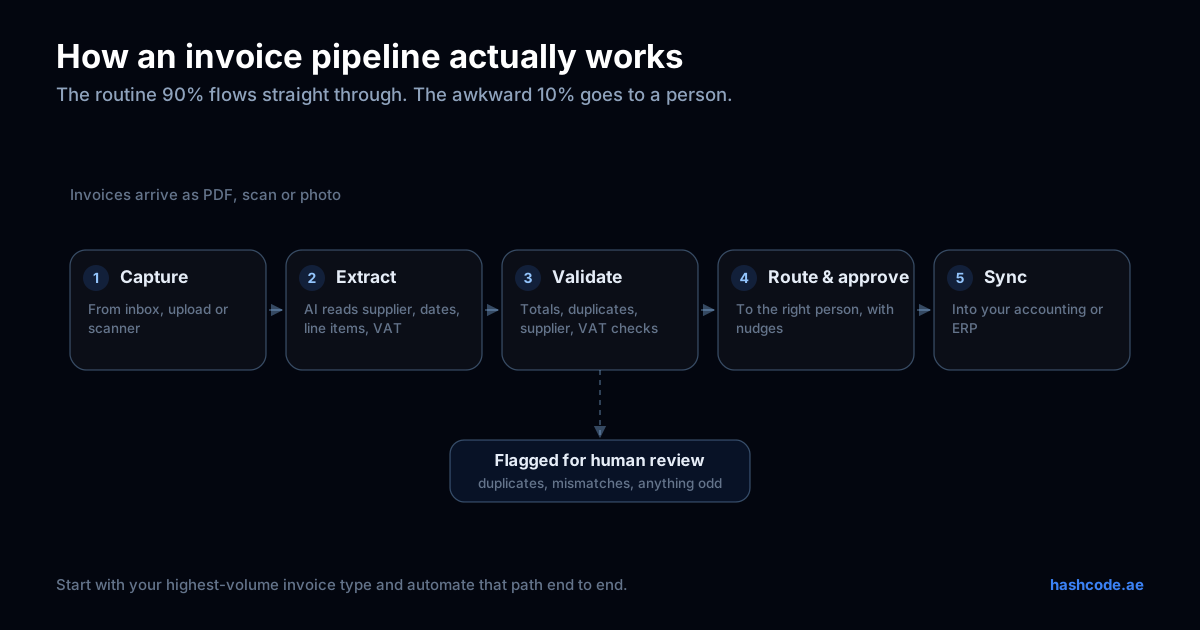
- 1Capture: invoices are collected automatically, from an email inbox, an upload, or a scanner, so nothing has to be forwarded by hand.
- 2Extract: the software reads the invoice and pulls out the fields that matter, supplier, invoice number, date, line items, VAT, total (the same details the FTA requires on a valid UAE tax invoice). Modern tools use AI here, so they cope with different layouts instead of needing a fixed template.
- 3Validate: the extracted data is checked, does the total add up, is this a duplicate, does the supplier match a known one, is the VAT right? Anything suspicious is flagged for a human instead of slipping through.
- 4Route & approve: the invoice goes to the right person for approval automatically, with a nudge if it's sitting too long.
- 5Sync: the final, approved data lands in your accounting or ERP system, no manual entry.
What it actually saves you
- Time: the hours spent typing invoices come straight back. For a business handling hundreds a month, that's real headcount freed for better work.
- Errors: no more transposed numbers, missed invoices, or double payments. The validation step catches the mistakes a tired human misses.
- Speed: invoices get processed and approved in hours instead of piling up, which means better supplier relationships and no late-payment surprises.
- Visibility: because everything flows through one pipeline, you can actually see what's outstanding at any moment.
Businesses that automate this kind of document-heavy work commonly report efficiency gains of 30 to 70% on the affected process, and invoice processing is usually one of the clearest wins.
How to get started
You don't need to boil the ocean. Start with your highest-volume, most painful invoice type, probably supplier invoices, and automate that one path end to end. Prove the time saved, then extend it to the rest. A focused invoice automation can often be up and running in a few weeks.
Two things to get right: keep a human in the loop for anything unusual (you want the machine handling the routine 90%, not making silent judgement calls on the tricky 10%), and make sure it plugs into the accounting system you already use rather than forcing you onto a new one.
Invoice processing is often the first domino. Once it's automated, the same approach usually applies to other documents you handle by hand, purchase orders, delivery notes, forms. If you're wondering what else is worth automating, our guide on the business processes worth automating first is a good next read.
How we help
We build document and workflow automation that reads your invoices, checks them, and files them into the systems you already run, with the right human approvals built in. We start by finding your most painful, highest-volume path, automate that first, and expand once you've seen the hours come back. If you're looking at this as part of something broader, our guide to business process automation in Dubai covers costs, payback and how to brief the whole programme.
Drowning in invoices?
Tell us how many you handle and how they arrive, and we'll show you what automating them could save. Reply within one business day.
Automate my invoicesFrequently asked questions
Can invoice automation read scanned or photographed invoices?
Yes. Modern invoice automation uses AI-based extraction that handles PDFs, scans, and photos, and copes with different supplier layouts, so you don't need a fixed template for every vendor.
Will automation make mistakes on my invoices?
A well-built pipeline validates every invoice (totals, duplicates, supplier match, VAT) and flags anything unusual for a human to check, rather than silently guessing. The machine handles the routine majority; people handle the exceptions.
Does it work with my accounting or ERP system?
It should. Good invoice automation is built to push the final, approved data into the accounting or ERP system you already use, so there's no manual re-entry and no need to switch tools.
How long does it take to set up?
A focused invoice automation, covering your highest-volume invoice type end to end, can often be running in a few weeks, then extended to other document types from there.
- Automation
- Finance
- Operations
Keep reading
Have a project in mind?
We build AI, automation, and software, and run it in production. Tell us what you're trying to do.
Start your project